Email marketing remains one of the highest-return channels in digital marketing: according to the DMA, it generates $36 for every $1 invested. But performance like that requires more than random mass emails. It requires infrastructure designed for delivery, opens and meaningful clicks.
Over eight days, our sending system processed 892 emails for one client campaign, producing the following results:
| Metric | Result | Industry benchmark |
|---|---|---|
| Emails sent | 892 | — |
| Delivery rate | 96.52% | ~90% |
| Open rate | 34.22% | ~21% |
| Click-through rate | 14.63% | ~2.6% |
| Bounce rate | 3.48% (0.78% hard) | ~5-10% |
| Complaints | 0 | — |
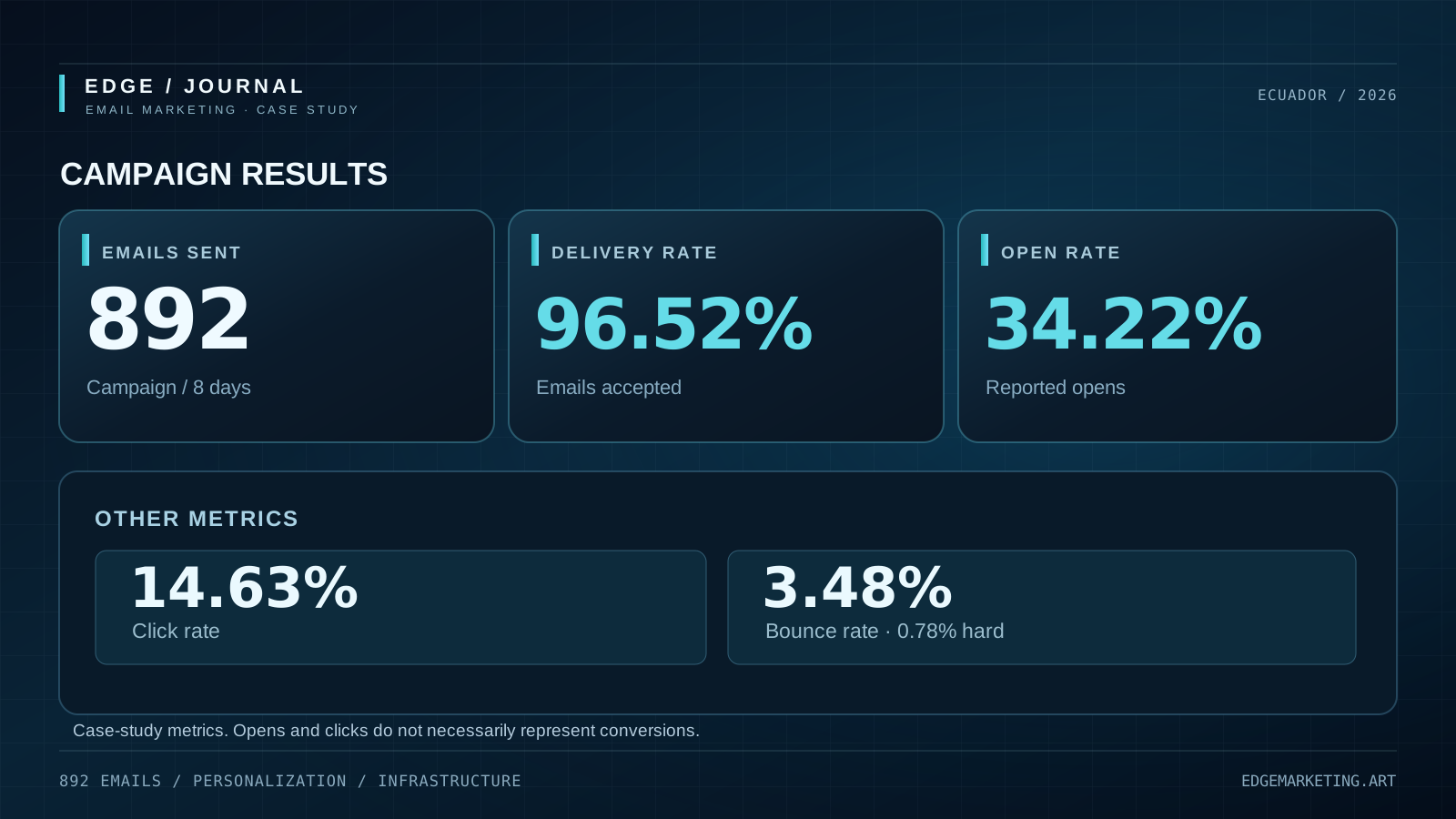
Metrics reported for this campaign; open and click rates should be interpreted alongside actual conversions.
That is 34% opens, almost twice the cited sector average, and 14.6% clicks, nearly six times the benchmark. This was not luck. It was the result of deliberate infrastructure design.
Sending-system architecture
The system uses Python 3 and the following components:
Brevo SMTP (smtp-relay.brevo.com:587) ←→ Scripts Python (smtplib)
     ↑
     |  (logs JSONL por cohorte)
     ↓
Excel (postulaciones) → API REST → render_html() → MIMEMultipart → sendmail()
                                                  └── JSONL logs
                                                  └── Reporte HTML
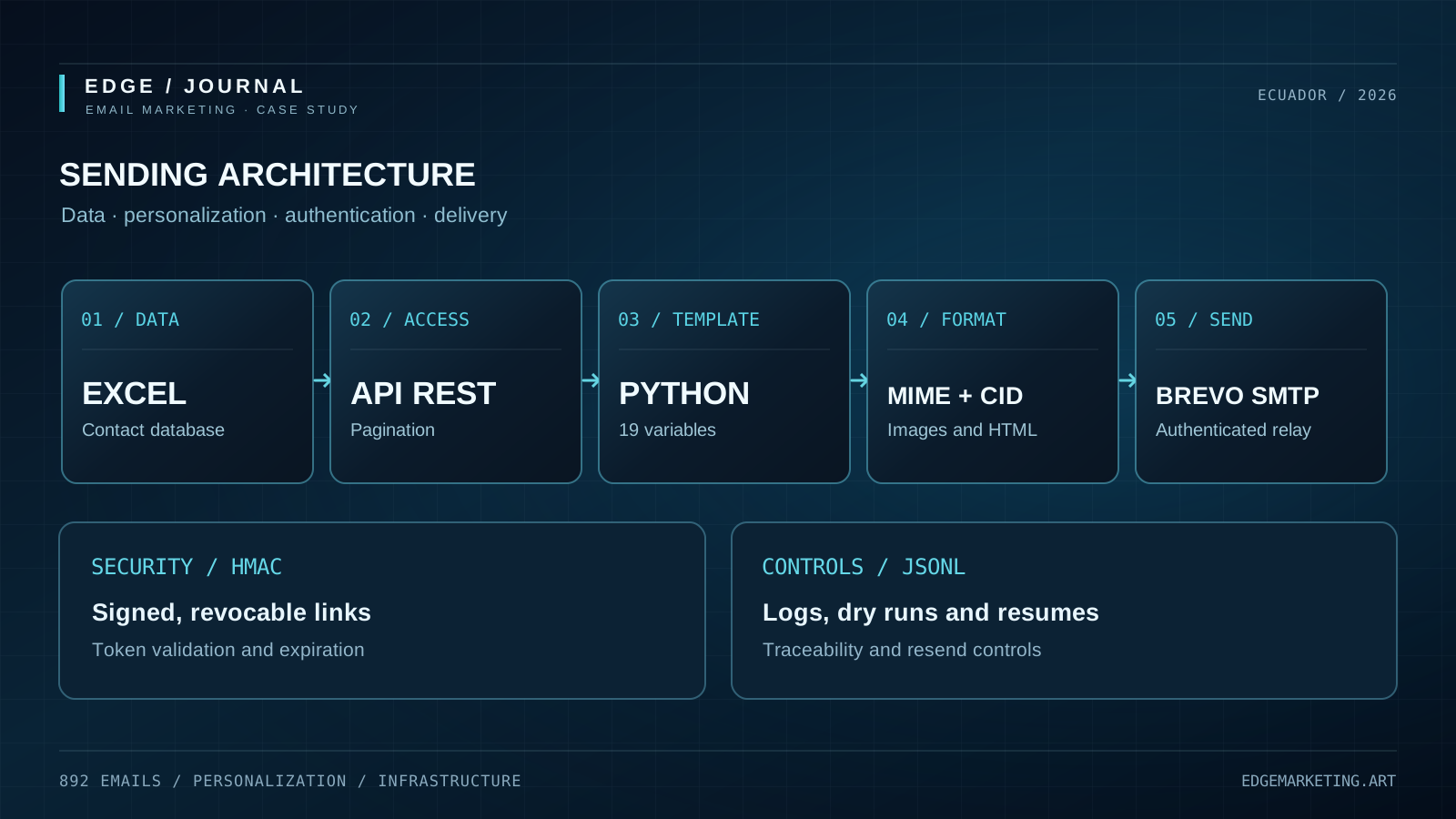
Conceptual sending-flow diagram. No credentials or recipients’ personal information are shown.
Brevo acts as the SMTP relay. The SMTP login and the visible sender address are not the same thing. The login is [email protected] (the Brevo account), while the visible sender is [email protected] (an SPF/DKIM-authenticated address). Arbitrarily changing the sender would break authentication and increase the risk of spam filtering.
The data originate in an Excel spreadsheet with 429 applications and are retrieved through paginated API calls, limited to 1,000 records per request. We learned that pagination was necessary when a dataset exceeded that limit.
Personalization for each recipient
Each email is an HTML template with 19 dynamic player fields: name, photograph, height, preferred foot, city, player code, session time, venue and more. Every message is rendered from the database in real time.
def render_html(jugador):
    # 19 campos dinámicos → HTML único por destinatario
    return f"""<!doctype html>
    <h1>¡Vas a la cancha, {nombre_corto}!</h1>
    <div class="carnet">
      <img src="{foto}" alt="Foto de {nombre_corto}">
      <span class="carnet-name">{nombre}</span>
      <span class="carnet-stat">{ciudad}</span>
      <span class="carnet-stat">{pie}</span>
      <span class="carnet-stat">{estatura}</span>
    </div>
    <a href="{url_convocatoria}">Ver mi convocatoria</a>
    ...
Player photographs may arrive from iPhones as HEIC files, which email clients generally do not support inline. The script detects the .heic extension and falls back to the brand logo, avoiding broken images.
Security: single-active HMAC-signed links
The “View my invitation” button is not a static URL. It is an HMAC-signed link with these properties:
- It is generated at send time through an API (
POST /api/convocatoria/enlace) - Each code has only one active link; issuing a new one revokes the previous link
- Tokens have an HMAC signature and expire after 30 days
- The server verifies the signature, revocation status and expiration
A recipient can still forward the email and its link. However, if the original recipient requests another link—for example, to correct a date—the previous one is automatically invalidated. Old links cannot continue circulating with outdated details.
# El enlace real se genera en el momento del envío:
jugador["url_convocatoria"] = enlace_convocatoria(
    codigo, hora_convocatoria, hora_llegada, admin_token
)
# En el log (JSONL), NO en el draft generado horas antes:
"estado": "ok",
"url_convocatoria": "https://registro.../convocatoria#t=eyJqdGkiOiJlaVNiWVo0..."
Lesson learned: HTML drafts stored on disk can contain expired links if a token has been regenerated for the same code. For resends, always read url_convocatoria from the JSONL log (status ok), never from an old HTML draft.
The compatibility challenge: email clients
One of the biggest obstacles to a well-designed email is inconsistency between email clients. Here is how we addressed it:
CID embedding to reduce blocked images
Outlook and Hotmail can block remotely hosted images when the sender has a limited reputation history, even if SPF and DKIM pass. Our solution was to embed actual images as cid: attachments inside the MIME message, avoiding external image requests. CSS background images remain remote because CID backgrounds are inconsistently supported; bgcolor provides a solid fallback.
Gmail Dark Mode
Gmail and iOS Mail may recolor dark backgrounds and obscure navy artwork in dark mode. Our solution combines an explicit bgcolor, background-image and [data-ogsc] selectors to preserve the intended appearance. The important detail is that Gmail applies [data-ogsc] to the same element it recolors, not necessarily a parent element, so selectors should not include an extra descendant space.
/* Gmail dark mode — el atributo data-ogsc solo aparece cuando
   Gmail activa su modo oscuro. Forzamos colores sobre el repintado. */
.carnet-name[data-ogsc]{color:#FFCC33 !important}
Emoji compatibility: BMP versus supplementary characters
⏰ (U+23F0, Basic Multilingual Plane) is supported widely. 📱👕 require more complete emoji font coverage and may appear as empty squares on older devices. For critical symbols, use BMP characters or SVG/data-URI icons.
Campaign controls: dry runs, logs and resuming
Accidental bulk sends are a serious operational risk. The system includes three safeguards:
- Dry run by default: running
python enviar_g1.pywithout--enviarprocesses and logs the campaign without sending messages. - JSONL logs for each cohort: every successful send is immediately written to
logs/envios-G1.jsonl. If a batch is interrupted,codigos_completados()reads the JSONL log rather than the Excel file to determine what remains. - Targeted resend:
--solo-codigo YSG-XXXX --reenviarresends one message without changing the rest of the campaign.
enviar_g1.py --cohorte G1 --drafts    # genera HTML de vista previa
enviar_g1.py --cohorte G1 --enviar    # envía de verdad
enviar_g1.py --cohorte G1 --solo-codigo YSG-0800 --reenviar  # reenvía uno
The Excel file is also saved after each successful send, rather than only at the end of a batch, so it remains up to date if the process stops.
Responsible rate limiting
time.sleep(0.7) # no saturar el relay de Brevo
We use 700 milliseconds between sends. That is not Brevo’s technical limit. It is responsible rate limiting to reduce aggressive bulk behavior and maintain deliverability. For 892 messages, that means about 10.5 minutes of distributed sending.
Results
We sent 892 emails between September 1 and September 8, with zero complaints and no authentication errors. Our 34.2% open rate was well above the cited 21% benchmark, while 14.6% clicks exceeded the cited 2.6% average.
The result came from infrastructure that respects recipients, authenticates properly and provides real value with each send.
Next steps
We are generalizing enviar_g1.py with --cohorte G1..G9 to support campaigns across multiple cohorts and time windows. Our next planned improvement is integration with EdgeMail (the local API in em-node-src) so agency campaigns can share the same logs, drafts and reporting infrastructure with EdgeMail as the web interface.
Edge Marketing Agency — Quito, Ecuador · edgemarketing.art